What Documents Are Required for Welo Badge Certification?
Welo Badge evidence requirements vary by business. Learn what may be requested, how to prepare, and where private verification files belong.

On this page
Welo Badge may request business registration or verifiable owner identity, domain-control evidence, policy links, billing clarifications, or information about customer support. There is no single document checklist for every applicant: the evidence needed depends on the business, the information already available, and any questions that arise during review.
The program evaluates business identity, website information, policies, and supporting evidence against the Welo Trust Standard. Businesses that earn certification can present published verification information to customers through a public Welo Page and a clickable badge. Preparing for review means making your company information clear and consistent, then responding to the specific evidence requested.
TL;DR
Welo Badge requests evidence appropriate to the business and its risk signals, rather than requiring identical files from every applicant.
Evidence can include public sources, policy links, explanations, technical confirmations, or requested documents.
Application review is not certification. Submit requested private files through Documents and follow the next action shown in your dashboard.
What Documents May Be Required for Welo Badge Certification?
The Welo Trust Standard describes conditional evidence requests, including identity and domain-control checks. In straightforward cases, direct website checks and public sources may provide sufficient evidence; subscriptions, complex billing, complaints, or inconsistent information can require a deeper review.
The table below explains published examples and practical ways to prepare. It is not a mandatory upload checklist.
Examples of Evidence Welo Badge May Request
Evidence category | Published examples | When it may be requested | Practical preparation |
|---|---|---|---|
Business identity | Business registration or verifiable owner identity | Identity signals are unclear or risk is high | Be ready to explain identity or company-name inconsistencies. |
Domain control | Registrar confirmation or technical proof of control | Ownership needs confirmation | Identify who manages the domain and can respond. |
Policies | Privacy, terms, refund, return, or cancellation links and clarifications | Policies are missing, unclear, or inconsistent | Locate the applicable live policy pages. |
Checkout and billing | Pricing, payment, billing, renewal, or cancellation clarification | Billing is complex or the offer involves subscriptions | Compare the website, checkout, and policy terms. |
Customer support | Evidence explaining support access or handling | The support process is unclear | Identify a working channel and explain how customers receive help. |
A request for evidence does not necessarily mean a request for a separate file. A working policy link may answer one question, while an ownership question may require a document or technical confirmation. Follow the actual request rather than assembling an assumed package of records.
Welo Badge Application Review, Business Verification, and Certification
Application review assesses the submitted company information and whether the business can proceed. Welo Badge may ask for information or documents before making that decision, so a request for evidence can be part of the initial review.
Business Verification is the substantive evaluation of identity, ownership, website information, policies, payments, support, and other relevant trust evidence under the Welo Trust Standard. These activities can involve clarification and follow-up, rather than a rigid sequence in which every business submits the same material.
Certification requires meeting the standard, not simply submitting an application or uploading documents. The standard combines baseline requirements, which every certified business must meet, with scored trust topics reflected in the Welo Trust Score. A strong score cannot compensate for a failed baseline requirement.
The program is intended for registered businesses with active online operations, including ecommerce, SaaS, and digital services. Submitting evidence does not override excluded activities or other eligibility requirements. Read who can qualify for Welo Badge for eligibility details, or use the step-by-step application guide for the broader process.
How to Prepare Evidence for Welo Badge Review
The following steps are preparation advice, not an official list of required documents. They help you identify information that may need clarification before you respond to a request.
Check company-information consistency. Compare the company details in your application with your website branding, contact information, and any requested evidence. Be ready to explain legitimate differences between a brand name and its operator.
Test your policy links. Make sure the relevant pages are accessible and describe the offer customers actually receive, including applicable refunds, returns, and cancellations.
Review checkout and subscription terms. Check whether prices, payment terms, renewals, and cancellation instructions agree across your sales pages, checkout, and policies.
Identify the right people to respond. Know who can answer questions about company ownership, domain control, billing, and customer support.
Keep responses focused. Provide the evidence requested and explain the issue it addresses, rather than uploading unrelated sensitive records.
For example, a subscription business should review whether its renewal explanation and cancellation instructions match what customers encounter in practice. That consistency matters more than having several documents that describe different terms.
Where to Submit Welo Badge Documents and Follow-Up Corrections
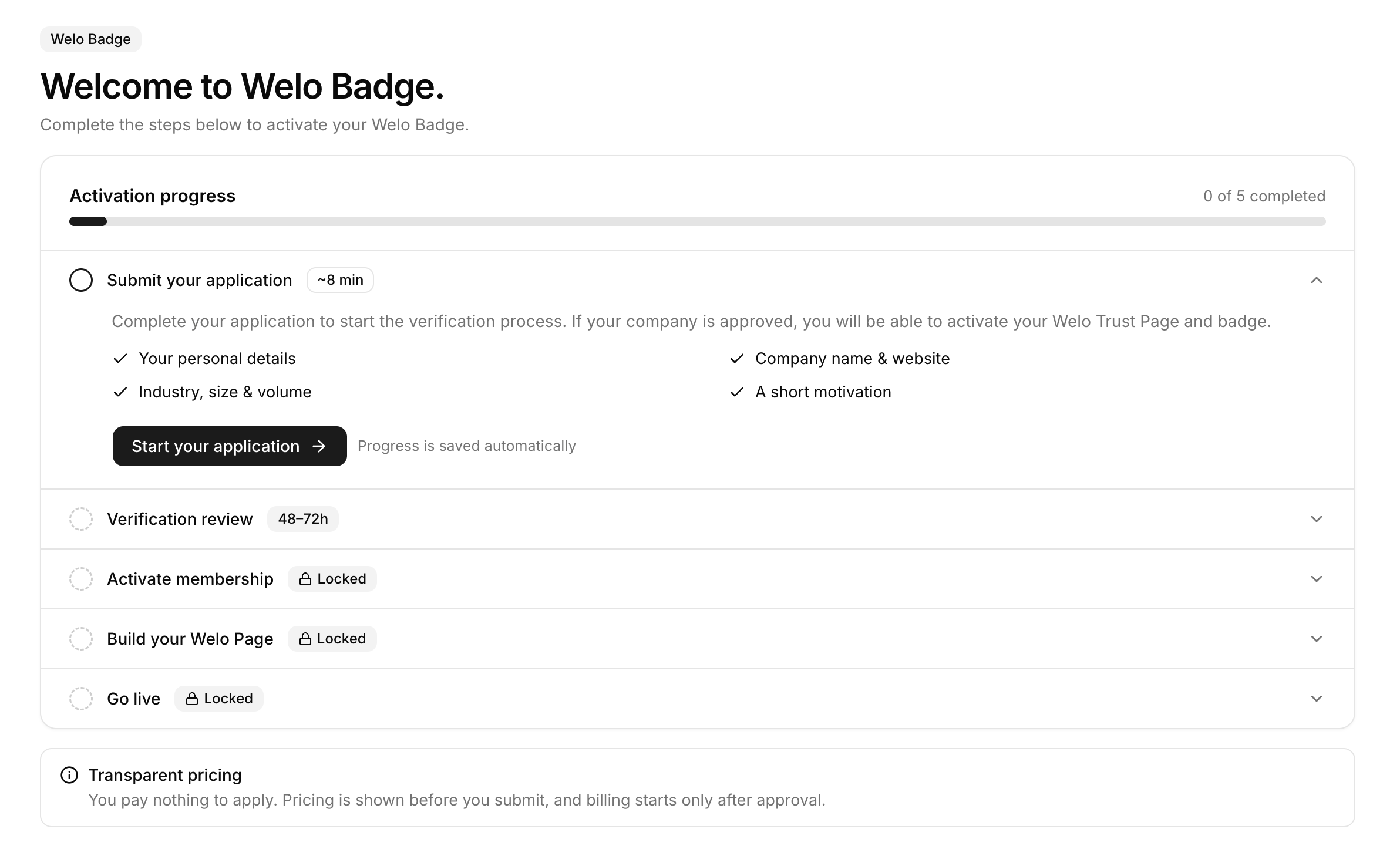
The dashboard shows the next action for your company, use that request to determine what to provide and where to submit it:
Check the next action in your client dashboard.
Read the request carefully to identify the question, information, or evidence needed.
Upload requested files through Documents.
Submit corrections through the corresponding portal task.
Follow-up requests may help resolve unclear identity, conflicting information, complex billing, complaint patterns, or other risk signals. A useful response addresses the underlying question, rather than simply adding more files. Under the published standard, insufficient evidence can prevent certification or lead to suspension; the volume of documents alone does not establish that a business meets the requirements.
Consult the current Welo Badge application and verification instructions for the maintained workflow. If a request or available action is unclear, contact Welo Badge support before submitting material that may not answer it.
Private Welo Badge Verification Files vs. Public Welo Page Content
Documents is where requested private verification files belong. Edit Welo Page is where you manage company information and content intended for your public profile. Uploading a private verification file is not the same as adding it to your public page.
A Welo Page brings together company information, published documents, approved Welo Trust Score information, and published reviews where available. Customers can use it to understand the business and its published trust information without seeing every record submitted during verification.

SKIMS
SKIMS Welo Page
Explore how a Welo Page presents company information, customer reviews, and public trust details.
Public-page changes may require review before they appear. The Welo Badge portal documentation explains the distinction between managing your profile and submitting private evidence.
What Happens After Welo Badge Application Approval?
Welo Badge reviews the application first and, after approval, proposes the applicable plan. Complete any required setup fee or subscription step shown in the portal before service activation and public-page go-live.
Once the required steps are complete, you can manage your public Welo Page and present the verification information approved for publication, including Welo Trust Score information where available. The clickable badge gives customers access to that page, where they can check the certification information. Certification reflects an assessment under the standard, not a guarantee of product quality or delivery.
The program also supports customer review collection and publication of eligible Welo Verified Reviews, subject to verification, account limits, and moderation. When your company is eligible to install widgets, open Widget to preview an option and generate company-specific code. See the Welo Badge widget options and widget installation instructions when you reach that step.
Prepare for Welo Badge Certification With Relevant Evidence
Start with the Welo Trust Standard, check that your company and website information agree, and respond to the evidence requested in your dashboard. A clear explanation, working link, or relevant file helps the team assess the actual question. If you are preparing to apply for Welo Badge certification, focus on accurate information and usable policies rather than building a large document bundle in advance.
FAQ
Does every Welo Badge applicant need to upload a business registration document?
The program is intended for registered businesses with active online operations, but registration status and a request to upload registration evidence are different matters. The standard lists business registration or verifiable owner identity as evidence that may be requested when identity signals are unclear or risk is high.
Can policy links count as evidence for Welo Badge certification?
Yes. Policy links and public website checks can provide evidence, particularly when the information is clear and consistent. Additional explanations or files may still be requested to resolve specific questions.
What file formats and upload sizes does Welo Badge accept?
Follow the instructions in your Documents upload area and the specific evidence request. For questions about an accepted format or file size, ask support before preparing or sending the file.
Will my Welo Badge verification documents appear on my public Welo Page?
Private verification files belong in Documents, not public-page fields. Public profile content is managed separately through Edit Welo Page, so a private upload should not be treated as a public-page submission.
Are ISO certification or SOC 2 reports required for Welo Badge certification?
They are not established as universal requirements for Welo Badge certification. Displaying credentials your business already holds is separate from the evidence requested for its verification, and Welo Badge certification does not award those credentials.